How to Choose a Virtual Try-On Tool: 8 Questions to Ask Before You Integrate
The demo went well. You uploaded a shopper’s photo, selected a flowing summer dress, and saw a result that looked like it came from a professional photoshoot. So the brand tried the same platform on its very own catalog, and the outcome was nothing like the demonstration.
This is one of the most common challenges fashion brands face when choosing a virtual try-on service. Many platforms can produce impressive AI images. Far fewer can deliver the same quality in a real retail environment with real products, real customers, and real-world mobile connections.
Choosing an AI virtual try-on tool is not about picking the one with the most impressive demo. It's about finding a solution that fits your products, customers, website, and business goals.
This guide looks at eight practical questions you should ask prior to integration. These are the areas covered, which include realism, platform support, setup effort, photo privacy, speed, catalog coverage, cost, and measurement. You'll also receive an easy-to-compare scorecard.
What Should You Look for in a Virtual Try-On Tool?
Before you book a single demo, it helps to know what you are actually judging. Most evaluations come down to eight areas:
Realism: Do the clothes look realistic on different people?
Integration: Does it integrate with Shopify, WooCommerce, or a custom store?
Implementation difficulty: How much development effort is required?
Privacy: What happens to customer-uploaded images?
Speed: How quickly does the shopper see a result?
Catalog support: Can it handle the products you actually sell?
Cost: How does the price change as you use more?
Measurement: Can you observe its use by shoppers?
8 Questions to Ask Before Choosing a Virtual Try-On Tool
1. How Realistic and Accurate Are the Results?
Everything depends on visual quality. If the result looks fake, shoppers will not trust it, and the feature becomes little more than decoration on your product page.
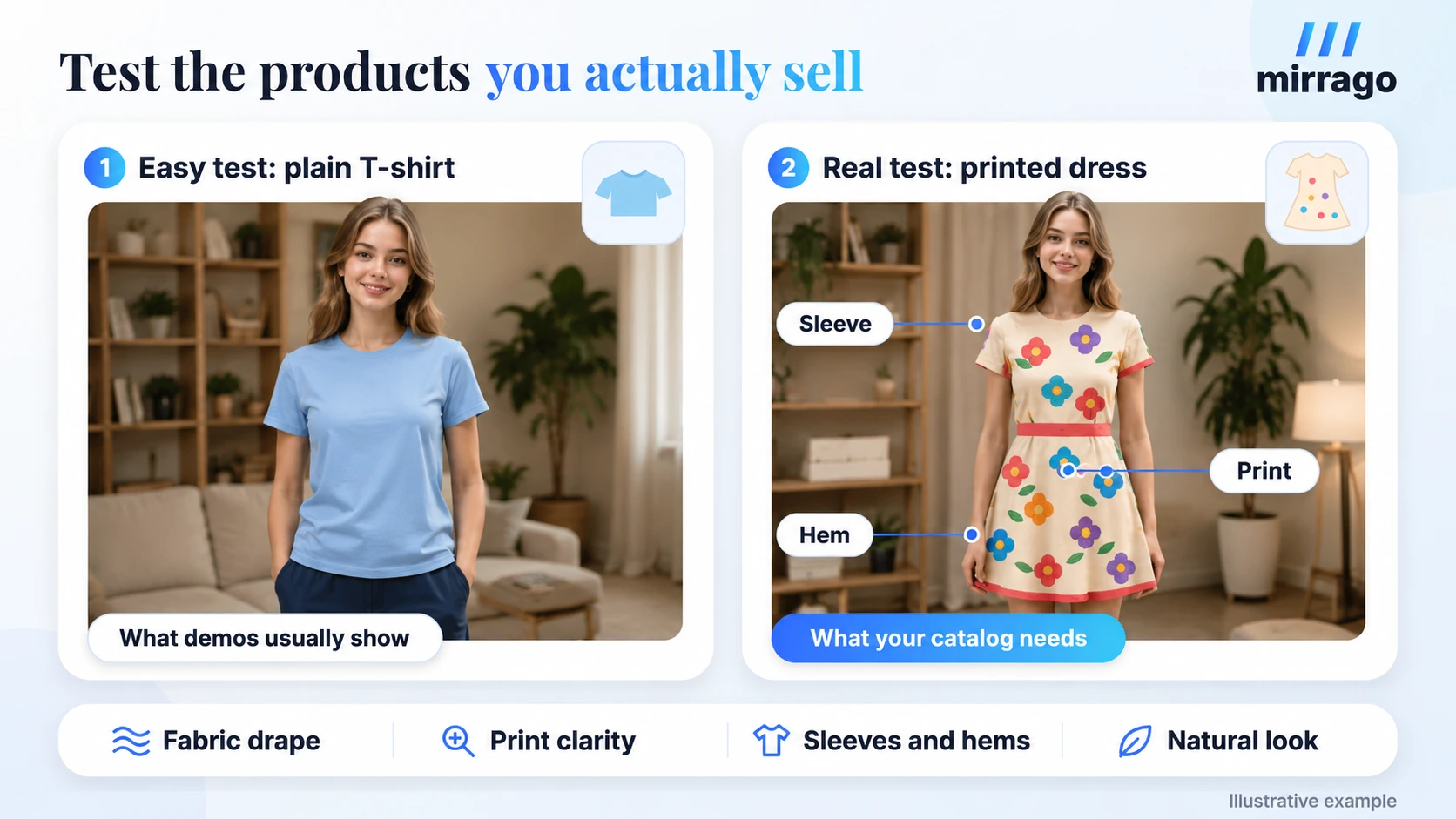
When checking results, consider:
How well the garment fits and drapes naturally on the body
Whether the fabric texture and drape look realistic.
How prints, patterns, and logos hold up
Details such as sleeves, collars, and hems.
How consistently the results perform across different body shapes, skin tones, poses, and photo conditions.
Vendor demos often use their best-performing products. Instead, ask to test more challenging items from your own catalog, such as wrap dresses, layered outfits, structured jackets, or patterned garments.
Key takeaway: Don’t evaluate a virtual try-on tool only with vendor-selected products. Test it with the products in your own catalog.
2. Does It Work With My Ecommerce Platform?
A great try-on experience is only valuable if it fits naturally into the platforms and shopping experiences your customers already use. See if they have platform support, like Shopify, WooCommerce, and WordPress, or if custom stores are available.
Integration typically takes one of four forms: a plugin, an app, an API, or a fully custom implementation. Each option involves different trade-offs in terms of development effort, flexibility, and cost.
Questions worth asking:
Can the try-on button appear directly on product pages?
How does it connect to our product catalog?
Are product variants, such as colors and styles, supported?
Does the experience work well on mobile?
Mirrago offers integration options for fashion ecommerce brands, including WooCommerce and API-based solutions, allowing businesses to choose an approach that fits their existing setup.
3. How Much Work Will Integration Actually Require?
There's an important difference between being "supported" and being "easy to implement." A provider may be able to integrate WooCommerce, Shopify, or whatever else but still require weeks of work to get it working for you.
Interview the developer about total developer time, product setup, image prep, configuration, design changes, testing, ongoing maintenance, and support during rollout.
Instead of asking, "Can you integrate with our website?" ask, "What will our team need to do, and how long will the complete implementation take?" A clear and specific answer is a good sign, while a vague response may indicate that more of the work will fall on your team.
4. What Happens to Customer Photos and Personal Data?
It's in this context that trust is created or broken. When a consumer puts themselves in a picture, you're giving your brand something personal. When something goes wrong, customers will blame you, but not the vendor.
Ask the provider:
Where are images processed?
Are they stored, and for how long?
Are they deleted automatically?
Are customer photos used to train AI models?
Who can access them, including third-party processors?
Instead of asking, "Are you GDPR compliant?" ask, "Can you walk me through what happens to a customer's photo from upload to deletion?" A trustworthy provider can answer that step by step. If you sell to shoppers in the EU or UK, this matters legally too. The GDPR storage limitation principle says personal data should not be kept longer than necessary.
Mirrago publishes its approach to how customer images are processed and retained.
5. How Fast Is the Try-On Experience?
Every try-on follows the same path:
Click Try On → Upload photo → Wait → See result. If the wait feels long, shoppers leave before they ever see the outcome.
Don't rely on the quoted rendering time. The upload speed, loading screens, failed generations, and ease of re-entry all contribute to the experience.
Make the complete trip on both a desktop and an iPhone and then an Android phone, but not with office Wi-Fi! This is the usual means of use for most of your customers.
6. Can It Handle My Product Catalog?
Not all apparel is susceptible to AI. A simple T-shirt isn't quite as complicated as a patterned dress, structured suit, or layered outfit. A number of providers perform quite nicely with simple products but fall apart with more complex products.
So try really hard products – not the easiest. Then ask:
What product images are required, and in what format?
How are new products added when a collection launches?
Which categories are supported today, such as dresses, jackets, pants, and activewear?
Can shoppers combine items to see a full outfit?
7. What Will It Cost as We Scale?
The initial price is often not the full cost. Pricing may depend on factors such as API usage, product volume, number of users, or the number of try-ons. Some providers may also charge additional fees for setup, support, customization, or enterprise features.
Consider how the cost will change as your business grows. For example, a store might start with 1,000 try-ons per month and later grow to 10,000. If the provider charges per try-on, your monthly cost could increase significantly as usage grows.
If our usage increases, how will our costs change?
8. Can We Measure Whether Virtual Try-On Is Actually Working?
Installing virtual try-on is not the goal. You need to understand whether shoppers are using it and whether it helps move them closer to a purchase.
Useful metrics include try-on usage, try-on completion, product page engagement, add-to-cart activity, and conversion. Check whether these metrics are available in a dashboard and whether the data can be connected with tools such as Google Analytics 4.
Your success path also depends on how you sell:
Ecommerce store: Try-on → Add to cart → Purchase
Bespoke or made-to-order brand: Try-on → Interest → Consultation → Appointment
Decide which path matters most to your business before launch. This will help you identify the right metrics and understand whether virtual try-on is contributing to your business goals.
Don't Choose a Tool From the Demo Alone
Demos are built to impress. They often use hand-picked products, ideal photos, and controlled conditions. Your store has far more variety than that.
Before you sign a long contract, run a small pilot with:
10 to 20 real products from your catalog
A mix of garment categories, including the difficult ones
Your own product images, not vendor-prepared ones
Desktop and mobile, on everyday connections
The complete customer journey, from product page to result
Track output quality and speed as you go. The real question is not how good the vendor's demo looks. It is how well the tool works with your products.
A Simple Virtual Try-On Vendor Scorecard
Once your pilot is done, you need a fair way to compare providers. Score each one from 1 to 10 in every area, multiply by the weight, and add up the results.
A Simple Virtual Try-On Vendor Scorecard
Once your pilot is done, you need a fair way to compare providers. Score each one from 1 to 10 in every area, multiply by the weight, and add up the results.
Evaluation area | Weight | What a high score looks like |
Realism and accuracy | 25% | Natural results on your own products |
Integration | 15% | Native support for your platform |
Privacy and security | 15% | Clear photo handling from upload to deletion |
Product compatibility | 10% | Handles your full range of categories |
Speed and user experience | 10% | Smooth on mobile, easy retries |
Analytics | 10% | Usage and conversion data you can act on |
Pricing and scalability | 10% | Predictable cost as usage grows |
Support | 5% | Fast, helpful responses during rollout |
Adjust the weights to match your priorities:
Luxury brands may give realism even more weight.
Small stores may care most about cost and ease of setup.
Larger retailers may focus on integration and scalability.
How Mirrago Fits Into This Evaluation
If Mirrago is on your shortlist, here is how it maps to the questions above.
Built for Fashion Ecommerce
Mirrago is an AI virtual try-on platform designed for fashion stores. Shoppers can see garments on themselves across a range of clothing categories and visualize complete outfits, right from the product page.
Multiple Integration Paths
Brands can use the WooCommerce plugin, connect their Shopify store, or integrate through the API with a custom-built store. This gives brands the flexibility to choose an integration method that works with their existing technology.
Privacy-Focused Processing
Mirrago publishes how customer images are processed and how long they are retained, so you can review the full photo journey before you integrate. [Internal link: AI virtual try-on privacy]
A Real Ecommerce Use Case
The New Armani case study shows virtual try-on running on a live WooCommerce fashion store. Instead of polished demo images, it looks at how real shoppers used the feature.
Common Mistakes Brands Make When Choosing a Virtual Try-On Tool
Choosing from demo images alone. A beautiful demo does not guarantee good results with your products.
Testing only simple products. Always include your most difficult garments.
Ignoring mobile users. Most fashion shoppers browse on their phones, so test there first.
Looking only at the starting price. Calculate the cost at the usage you expect next year.
Treating privacy as a checkbox. Understand what actually happens to customer images.
Launching without defining success. Pick your metrics before go-live, not after.
How should I test a virtual try-on solution?
Start with a small pilot of 10–20 real products from different categories. Test the experience on both mobile and desktop before committing to a full integration.
Conclusion
You can't choose a virtual try-on tool based on features alone. The right solution is the one that fits your products, ecommerce platform, customers, privacy requirements, budget, and business goals.
Use these eight questions as your evaluation checklist, and test each provider with your own products before making a long-term commitment. Real-world testing is one of the best ways to understand whether a solution will work for your store.
When you're looking into virtual try-ons in your fashion business, find out how Mirrago integrates with your current platform and if it aligns with your business goals.
Frequently Asked Questions
What should I look for in a virtual try-on tool?
Focus on eight areas: realism, platform integration, setup effort, photo privacy, speed, catalog coverage, cost at scale, and measurable results.
How accurate are virtual try-on tools?
Accuracy varies a lot between providers and garment types. The only reliable way to judge it is to test your own products, including complex ones.
How much does virtual try-on software cost?
Pricing depends on the platform, the number of try-ons, the integration method, and your scale. Always ask what the cost looks like as usage grows.
Can virtual try-ons integrate with Shopify or WooCommerce?
Many providers support both, but the method differs. Some offer a plugin or app, while others need API or custom development work.
Is virtual try-on safe for customer photos?
It depends on the provider. Check how photos are stored, when they are deleted, who can access them, and whether they are used to train AI models.